


Holy Bible Reina Valera 1960
4.95.16K Reviews
App Specs
- Version
- 15.1
- Updated On
- License
- Free
- Downloads
- 1,000,000+
- Developer
- Daily Bible Apps
- Categories
- Books & Reference
- Platform
- Android, iOS
Screenshots
 Analysis by AppCompare
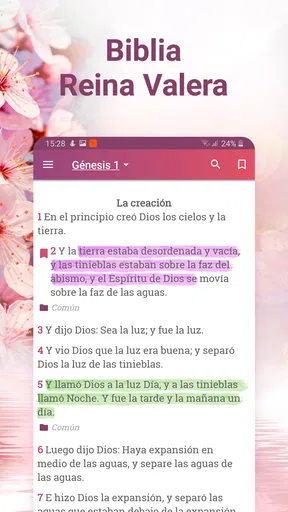
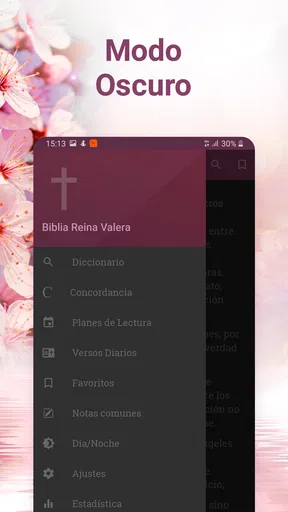
I found Holy Bible Reina Valera 1960 most useful as a practical Spanish Bible for everyday reading rather than as a visually elaborate study platform. It is a free Books & Reference app from Daily Bible Apps, centered on the Reina-Valera 1960 translation and supported by tools such as a concordance, dictionary, and audio. That combination makes it easy to move from reading a passage to checking a word or listening when looking at the screen is inconvenient.
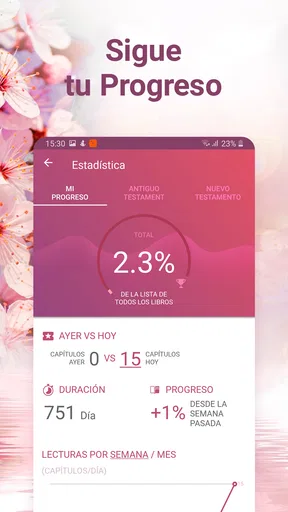
My overall impression is that it aims for quick access and broad usefulness. The app has reached over a million installs and holds a 4.9 average from around one hundred seven thousand ratings, which suggests that its straightforward approach works for many readers. I would still judge it by a more personal question: does it fit the way you actually use a Bible? For someone who wants Spanish scripture close at hand, it has a strong case. For someone seeking an academic research suite, a large social community, or a highly polished reading-plan experience, the answer is less certain.
How it feels in everyday use
I find the most useful way to judge this Bible app is to notice how it fits into small, ordinary moments: a quick passage before the day begins, or listening when reading is impractical. Its familiar Spanish text keeps the focus clear, while the reference tools invite a little more exploration when I have time. That everyday rhythm also makes it worth considering what choices and controls matter before I make it part of a routine.
Fast access matters more than visual decoration
The first strength I noticed is the app’s clear purpose. It is not trying to be a general reading platform filled with unrelated books. You open it to read the Reina-Valera 1960 Bible, look up a passage, explore a term, or listen to the text. That focused design is valuable when I want to find a verse quickly instead of navigating through several layers of content.
In ordinary use, speed is not only about how quickly a screen appears. It is also about how little thinking is required before reaching the passage I need. A Bible app can feel slow even when the phone is responsive if its navigation is crowded or its search behavior is confusing. Here, the combination of the familiar translation and reference tools gives the experience a direct, task-oriented character.
I would especially recommend it for a reader who switches between short visits and longer sessions. A short morning reading, a verse lookup during a conversation, and a longer evening chapter all make sense within the same app. The audio option adds another route into the text, which is useful when I am walking, preparing a meal, or trying to reduce screen time.
What happens during heavier use
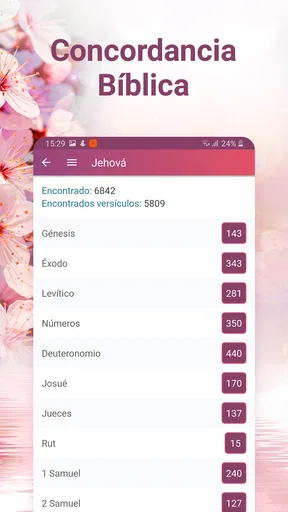
The app becomes more demanding when I stop using it as a simple reader and start combining its tools. Moving from a chapter to a concordance entry, checking a dictionary definition, and then returning to the original passage is a more involved workflow than simply scrolling through scripture. That is also where the app’s value becomes clearer: the reference features are close enough to support study without requiring a separate search engine or printed reference book.
Worth Reading Before You Choose

EA SPORTS FC Mobile 26 Is a Bigger Football Game, but It Takes Time

Flipboard Shows What News Apps Must Do Beyond the Feed

Switching to Android Auto Means Rethinking Your Driving Routine

Google Calendar Makes a Crowded Week Easier to Manage

Ludo King Makes the Most of the Minutes Between Plans

Baby Panda World Brings Quick Play to Modern Phones, but Its Game Library Feels Busy
Audio changes the nature of a session as well. Reading is usually a quiet, screen-based activity, while listening depends on uninterrupted playback and a comfortable way to control the session. I would use audio for repeated exposure to a passage or for listening while doing something else, but I would not treat it as a replacement for careful visual study. When I need to compare wording, notice paragraph structure, or pause over a particular phrase, reading remains more precise.
A useful workflow is to begin with a specific question rather than opening every tool at once. I might search for a passage, read the surrounding verses, and only then use the concordance or dictionary for a term that genuinely needs attention. This keeps the app from becoming a chain of distractions. The strongest feature is not any single tool in isolation; it is the way the reading and reference functions can support one another.
Reliability during normal reading
For a Bible app, reliability means more than avoiding crashes. It means returning to the text without losing my place, keeping navigation understandable, and making the core reading experience feel dependable. This app’s narrow purpose helps it here. There are fewer kinds of content competing for attention than in a broad devotional platform, so the central task remains easy to understand.
I also appreciate that the app is suitable for a wide audience. Its content rating is Everyone, and the minimum operating-system requirement is Android 7.0. That makes it a realistic option for people who are not using a recent flagship phone, including family members who prefer older devices. The current version is 15.1, so users should still keep the app updated when their device offers an update, particularly if they depend on audio or reference tools regularly.
My practical advice is to test the app before relying on it for an important group reading or trip. Open several books, try the search, check the dictionary and concordance, and play audio for a while. This is not because I expect routine use to be difficult, but because personal preferences vary: one reader may find the controls obvious while another may need a few sessions to develop a comfortable rhythm.
Older phones and resource expectations
The Android 7.0 requirement is encouraging for compatibility, but compatibility is not the same as identical performance on every phone. An older device may handle ordinary reading comfortably while taking longer when switching between text, reference material, and audio. I would expect the smoothest experience from a phone with enough free storage and a healthy battery, especially for readers who spend long periods listening.
Resource demands also depend on how the app is used. Reading a chapter is a lighter task than keeping audio active while moving between tools. If your phone is already crowded with background apps, has limited free space, or struggles with other media applications, you may notice more friction than someone using a newer device. That is a general device constraint rather than a reason to dismiss this particular Bible, but it is worth considering before making it your only reading option.
For a modest phone, I would keep the workflow simple: open the passage first, avoid jumping rapidly among several sections, and close other demanding apps if audio becomes inconsistent. I would also avoid judging the experience from a single brief launch. A Bible app is something many people open repeatedly throughout the day, so the important test is whether it remains comfortable across those small sessions.
Where the app is especially useful
One realistic scenario is a Spanish-speaking reader preparing a short devotional before work. They can open the Reina-Valera 1960 text, read the passage, search a word that feels unfamiliar, and listen to the section later while commuting. That is a more complete routine than simply carrying a digital copy of the Bible, yet it does not demand the complexity of a professional study program.
Another good use is family reading. Because the app is free and rated for Everyone, it can be introduced without asking each person to buy a separate reference volume. A parent or grandparent who prefers Spanish can read directly, while a younger family member can use the audio feature or look up a term in the dictionary. The shared translation also avoids the confusion that can come from everyone following a different edition.
I also see value for someone returning to regular Bible reading after a long break. The app does not require a complicated setup to begin with a familiar translation. Starting with a known book and a manageable passage is less intimidating than opening an advanced study tool filled with panels, notes, and unfamiliar terminology.
Where another option may suit you better
I would hesitate to recommend it as the only app for a serious researcher who needs extensive cross-translation comparison, scholarly annotations, or a large personal library. The concordance and dictionary make it more capable than a plain digital text, but those tools do not automatically turn it into a full academic workspace. If your study depends on comparing many editions side by side or organizing extensive notes, a dedicated study platform may be a better fit.
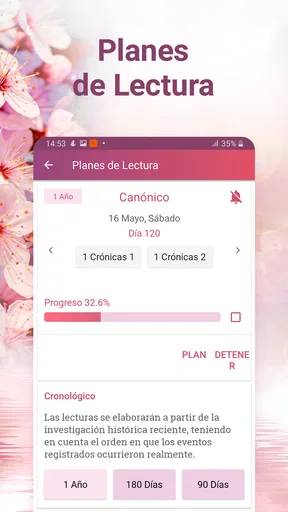
It may also be the wrong choice for a reader whose main goal is a highly structured devotional program. Some people want guided plans, reminders, journaling, social discussion, or a strong emphasis on daily motivation. This app’s identity is closer to a Spanish Bible with supporting references and audio. That focus is a benefit when you want less clutter, but it may feel limited if you expect a complete spiritual-planning system.
There is another trade-off around simplicity. A focused Bible app can be easier to open and use, yet it may offer fewer ways to personalize the experience than a larger reading ecosystem. I would choose this one when the Reina-Valera 1960 text is the priority. I would choose something else when customization, community features, or a broader collection of translations matters more than direct access.
Cost and the practical value of the extras
The app is free to download, which removes the biggest barrier for casual readers and families. It also includes optional in-app purchases priced at $2.99 per item. That means the basic decision is easy: install it and see whether the reading experience fits you before spending anything. I would not pay for an extra simply because it is available; I would first identify whether it improves a workflow I actually use.
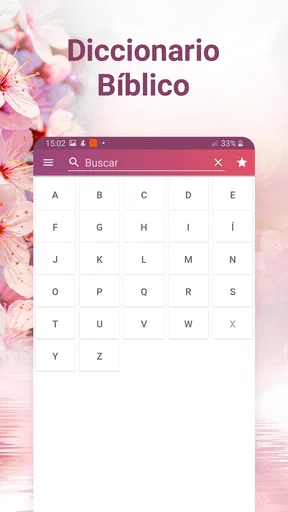
The most valuable tools, in my view, are the ones that reduce friction during a real reading session. Audio can make scripture available when the screen is inconvenient. The concordance can help trace a word or theme without leaving the app. The dictionary can make an unfamiliar term less of a stopping point. Used selectively, these features justify choosing this app over a bare text reader.
There is a small discipline involved: reference tools can encourage endless tapping. My preferred method is to read the passage in context before investigating individual words. Otherwise, it is easy to lose the main idea while chasing definitions. The app supports study, but the quality of the study still depends on how deliberately I use those tools.
Stability, recovery, and daily confidence
When I evaluate a reading app, I pay attention to how easy it is to recover after an interruption. A phone call, a low-battery warning, or a switch to another app should not turn a simple reading session into a hunt for the same passage. The focused structure of this Bible makes recovery reasonably straightforward: I know I am returning to scripture rather than to a feed, storefront, or collection of unrelated recommendations.
Audio deserves a separate expectation. Any listening session is more sensitive to device conditions than silent reading. Battery level, other active apps, and the phone’s general age can affect comfort even when the Bible text itself remains easy to access. If audio is central to your routine, I would keep the phone charged and establish the passage before beginning another activity. That is a simple habit, but it prevents many avoidable interruptions.
For occasional readers, the app should feel forgiving because the central action is uncomplicated. For heavy users, reliability will depend on whether the combination of reading, searching, dictionary use, concordance browsing, and audio matches the capacity of the phone. I would describe it as a sensible everyday tool rather than a demanding multimedia workstation.
My final assessment
The best reason to choose this app is its balance between a familiar Spanish translation and useful study support. It is free, accessible on devices running Android 7.0 or later, and developed by Daily Bible Apps. Its 4.9 average and more than five thousand reviews reflect strong user approval, while its broad install base shows that it has found a substantial audience.
I would recommend it to Spanish-speaking readers who want the Reina-Valera 1960 close by, need occasional dictionary or concordance help, and appreciate the option to listen. It is particularly practical for short daily readings, family use, travel, and anyone moving between visual reading and audio. The app’s focused design also makes it easier to return to the main task than many busier alternatives.
I would skip it if your priorities are advanced scholarly comparison, extensive annotation management, or a deeply structured devotional community. In those cases, a larger Bible study platform may offer more depth, even if it takes longer to learn and may feel heavier on an older phone.
For my own recommendation, this is a dependable starting point and a useful long-term companion for straightforward Spanish Bible reading. The key is to use its extras with purpose: read in context, use the dictionary when a word blocks understanding, use the concordance when tracing a theme, and reserve audio for moments when listening genuinely fits better than reading. With that approach, Holy Bible Reina Valera 1960 stays focused, practical, and easy to return to.
Pros
- Includes the complete Reina-Valera 1960 Bible offline.
- Fast search helps locate verses
- books
- and keywords quickly.
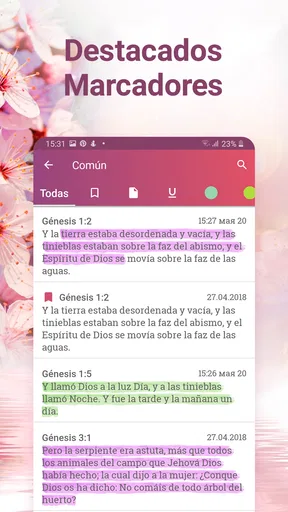
- Bookmarks and favorites make it easy to save meaningful passages.
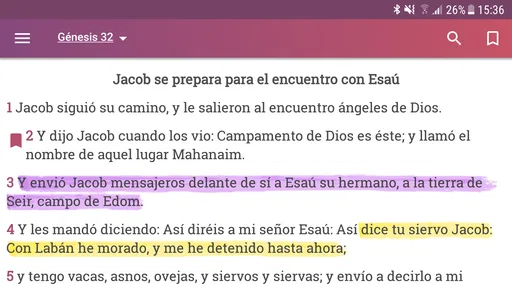
- Readable interface with adjustable text size for comfortable study.
- Useful for Spanish-speaking users seeking a traditional Bible translation.
Cons
- The 1960 Spanish wording may feel difficult for younger readers.
- Some features may require internet access or display occasional ads.
- Limited study notes compared with dedicated Bible study platforms.
- Audio Bible availability may vary by version or require an extra download.
- Older devices may experience slower performance with larger resources.
FAQs for Holy Bible Reina Valera 1960
What is Holy Bible Reina Valera 1960?
Holy Bible Reina Valera 1960 is a Spanish-language Bible app based on the widely recognized Reina-Valera 1960 translation. It is designed for reading and studying the Old and New Testaments on a mobile device. Depending on the version available, it may include navigation by book and chapter, search tools, bookmarks, notes, sharing options, and daily reading features.
Does Holy Bible Reina Valera 1960 work without an internet connection?
In many versions, the Bible text can be accessed offline after the application and its content have been installed, which is useful when traveling or reading in places without reliable connectivity. However, features such as advertisements, synchronization, online audio, updates, or other external resources may require internet access. Check the app description and test offline reading after installation.
Is the Reina-Valera 1960 translation suitable for personal Bible study?
Yes. Reina-Valera 1960 is one of the most familiar Spanish Bible translations among Protestant and evangelical readers, making it useful for personal devotion, church study, memorization, and following sermons. Its traditional language may feel formal or old-fashioned to some users, so readers who prefer contemporary Spanish may want to compare it with another translation.
What reading and study features does the app offer?
The available features can vary according to the developer and app version, but users commonly expect chapter and verse navigation, keyword search, bookmarks, highlights, personal notes, reading history, and verse sharing. Some editions also provide adjustable text size, night mode, reading plans, or audio playback. Review the permissions and current store listing to confirm which tools are included.
Is Holy Bible Reina Valera 1960 free to download and use?
The application may be available as a free download, although the exact business model depends on the publisher. Free editions can include advertising, optional purchases, or premium tools such as ad removal, audio, synchronization, or additional study resources. Before downloading, check the Google Play or App Store listing for in-app purchases, privacy information, supported devices, and any limitations affecting offline access.


